Description
AirwaveChat is a sophisticated radio communication plugin that brings realistic AM/FM radio functionality to your Minecraft server. Players can communicate across long distances using over 1000 available frequencies with authentic signal degradation and static effects.
Privacy First: Radio communications are 100% private with EventPriority.LOWEST ensuring complete isolation. No external plugins can intercept radio messages, and communication is automatically limited to the same world.
Perfect for roleplay servers (Police, EMS, military channels), survival servers, PvP coordination, minigames, and faction servers. The plugin is fully configurable, thread-safe with Folia support, and features async file I/O for smooth performance.
Key Features
AM/FM Bands
AM: 1000-1999 kHz (~100 blocks) • FM: 100.0-199.9 MHz (~40 blocks)
Signal Degradation
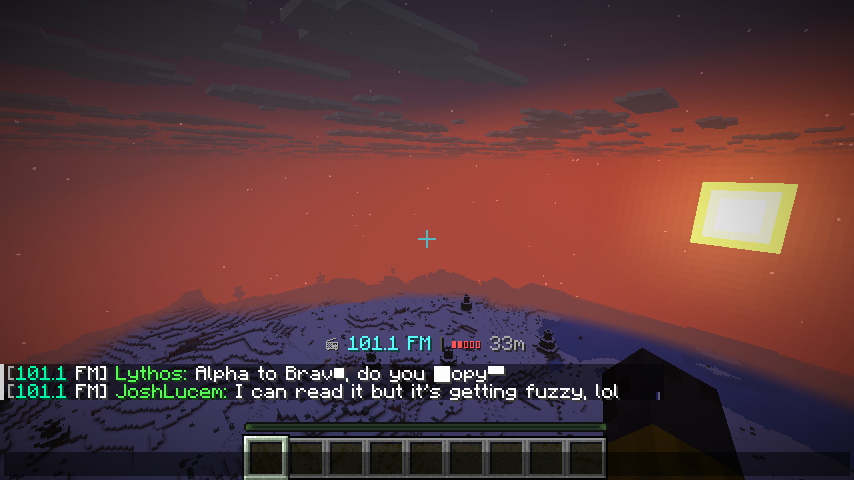
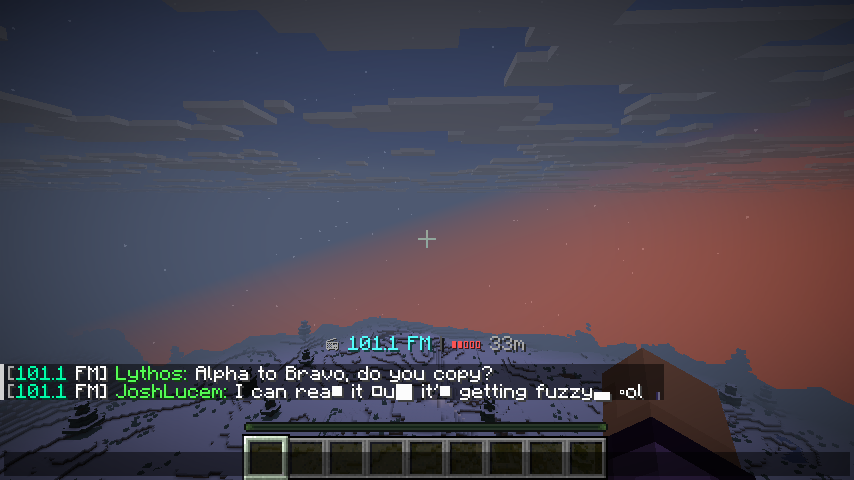
Realistic static effects with distance-based text distortion
100% Private
Complete communication isolation, no external interception possible
1000+ Frequencies
Plenty of channels with custom named frequencies support
Live Signal Bar
Real-time band/frequency/strength indicator in action bar
Folia Support
Thread-safe with async I/O, only 40KB footprint
Installation
- Download the latest version of AirwaveChat from the download button above
- Stop your Minecraft server
-
Place the
AirwaveChat.jarfile in your server'spluginsfolder - Start your server to generate the default configuration files
- Customize the settings in
plugins/AirwaveChat/config.yml - Restart your server and enjoy!
                                            /connect FM/AM <frequency> - Connect to a frequency (aliases: /c,
                                            /radio, /tune)

                                            /disconnect - Disconnect from current frequency (aliases: /dc, /leave,
                                            /tune-off)

                                            /frequencies list [FM/AM] [page] - List available frequencies (aliases:
                                            /freq l, /f l)

                                            /frequencies current - Show current frequency (aliases: /freq c, /f c)

                                            /frequencies info <frequency> - Get frequency info (aliases: /freq i,
                                            /f i)

                                            /frequencies top - Show most popular channels (aliases: /freq t, /f t)

                                            /frequencies search <query> - Search channels by name (aliases: /freq
                                            s, /f s)
                                            /airwavechat reload - Reload configuration (aliases: /awc reload)

                                            /airwavechat about - Show plugin info (aliases: /awc about)

                                            /airwavechat help - Show help menu (aliases: /awc help)
                                            airwavechat.user - Access to user commands (default: true)

                                            airwavechat.admin - Access to admin commands (default: op)
AirwaveChat comes with extensive configuration options:
frequencies:

  fm:

    min: 100.0

    max: 199.9

    step: 0.1

    chat_distance: 40.0

  am:

    min: 1000

    max: 1999

    step: 1

    chat_distance: 100.0

  custom:

    Police:

      type: "FM"

      frequency: 123.5

      chat_distance: 60.0

    Emergency:

      type: "AM"

      frequency: 1050

      chat_distance: 150.0


options:

  enable_proximity: true

  enable_static: true

  static_threshold: 0.75

  static_intensity: 0.5

  enable_signal_bar: true

  enable_sounds: true

  cooldown_connect: 2

  cooldown_disconnect: 2
All messages are customizable with MiniMessage format support in messages.yml
As you move further from other players, your signal weakens. Characters progressively drop out or become garbled (shown as ▯), simulating real radio interference.
| Distance | Signal Quality | Effect | Example |
|---|---|---|---|
| 0-60% | Clear | Perfect | "Meet at the tower" |
| 60-75% | Good | Minor static | "Meet at t▯e tower" |
| 75-90% | Fair | Heavy static | "M▯▯t at ▯▯e ▯o▯er" |
| 90-100% | Weak | Severe static | "▯▯▯▯ ▯▯ ▯▯▯ ▯▯▯▯▯" |
| 100%+ | None | No signal | (message not received) |
Use Cases
- Roleplay Servers: Police, EMS, military, and civilian channels with realistic communication
- Survival Servers: Coordinate with your team across distances
- PvP Servers: Strategic team communication without console visibility
- Minigames: Team-based modes with radio coordination
- Faction Servers: Private faction channels with encryption-like privacy
Screenshots
Support & Community
Need help with AirwaveChat? Found a bug? We're here to help!
- Join our Discord server for quick support
- Report bugs on GitHub Issues
- View source code on GitHub
- Check the SpigotMC page for discussions
- Contact the developer: @joshlucem
License: Proprietary Software - All rights reserved. For commercial use or inquiries, contact @joshlucem on Discord.